Score Perfect to MusicXML converter
Project – | Article by Maarten Tromp | Published | 2103 words
Introduction
The Score Perfect music notation software has been discontinued (its sole developer died in 2012), and there was no practical way to migrate scores to other software other than copying them by hand. I had recently been working on a few other reverse-engineering projects, so this looked interesting.
Details on the file format are available on the SPP 1–4 file format and SPP 5–7 file format pages.
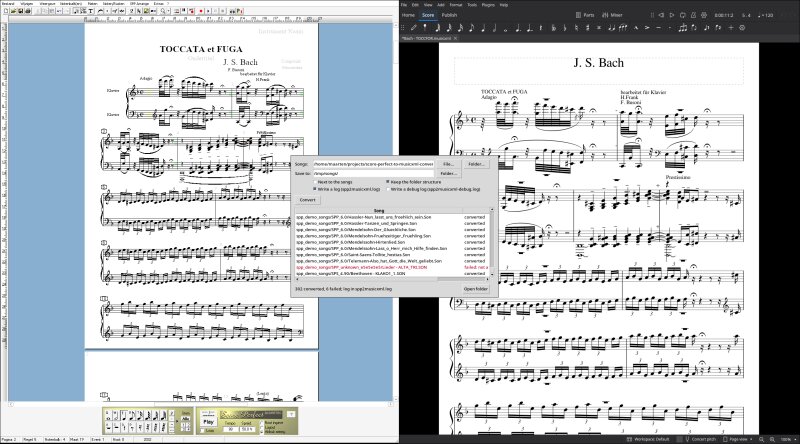 From SPP to MusicXML with spp2musicxml
In this article:
My dad has been using this software since version 1, first on the Atari and later on Windows. All his scores are stuck in the SPP file format. And he is not the only one. I found a few MuseScore forum posts of people having the same problem.
Although SPP can export to MusicXML, it only exports the notes. Other information, such as chords and lyrics, is omitted. SPP can also export MIDI, but that loses even more information. My goal was therefore to write a converter that reads SPP files and outputs MusicXML. I worked on this project on and off over the past four years, for a few months in total.
SPP versions and timeline
Score Perfect was written by Klaus Kleinbrahm and first released for the Atari in 1990. It came in three editions: Education, Standard and Professional. Most people refer to the Professional edition as SPP, and this article does the same. Version 3 (1995) was also available for Windows, possibly running through Atari emulation. Version 5 (2007) was a Windows-only rewrite in Visual Basic 6.
In 2001, PriMus forked from SPP. Both SPP and PriMus can read files created before the split. SPP 5 (2007) introduced a new file format that PriMus could not read. SPP 5 Lite was also available, alongside the Standard and Professional editions.
I also came across a predecessor to SPP 1.0: Score Perfect 1.2-K (1988). It predates the release of SPP 1.0 by two years and uses yet another file format.
Disassembling the software
There were two ways I could see to investigate the file format: disassemble the Score Perfect software to see how it works, or dissect saved files. This section covers the first approach.
To analyse the software, or even to see what a score should look like, you first need a copy of it. My dad gave me his registered copies of SPP 5.2, 6.0 and 7.0, and I found several demo and Lite versions online. All the versions that are publicly available are listed in the downloads section of this article, along with information on how to run them and where they came from.
Next, I had to get those versions working under Wine. The Visual Basic versions required a whole bunch of DLLs and OCXs to be installed, with some of them registered as well.
Once the software was working, I started by looking at version 6.0. I had found VBDec, an open-source VB6 decompiler. Visual Basic can be compiled to P-code, the bytecode for the Visual Basic virtual machine, which is relatively easy to reverse-engineer. Unfortunately, SPP 6.0 turned out to be compiled to native code rather than P-code, so all I could get were disassembly listings. This is true of all the VB-based SPP versions. The binaries are also properly stripped, so almost all I could see were strings and DLL method calls.
I had heard that the Atari versions were written in GFA BASIC. Since GFA BASIC is also available for Windows, I wondered whether Score Perfect might retain its original GFA BASIC core, with Visual Basic serving only as a thin wrapper around the user interface. Some digging disproved this hypothesis: Score Perfect 5 is a complete rewrite.
I had gained some experience disassembling Windows binaries with Ghidra during reversing the EVBox ChargeStation Tool, so I put that experience to use in this project.
Searching the executable for the MusicXML note-duration names (quarter, eighth, and so on), I found the MusicXML export function. A bit more digging located the open-file dialog. Somewhere between those two functions should have been the code that accesses the score in memory. After several days of digging, I put this approach on hold and focused on the file format instead.
While working on the SPP 1–4 format, I went back to reverse-engineering.
The SPP 4.0 demo ran under Wine without any problems. It turned out to be a 16-bit Windows application. It looked a lot like native Atari applications, which strengthened my hypothesis that it was actually Atari software running in an emulator. The disassembly showed GFA-style procedure names (_P_demo_nicht), confirming that it was written in GFA BASIC.
Another way to investigate the SPP 1–4 format was through PriMus's son2emil converter. I used Claude Code while analysing the converter in Ghidra, to see how some of the remaining tags were interpreted.
Reverse engineering saved files
I ended up focusing mostly on the saved files, since I found them easier to understand than disassembled Visual Basic code.
The Score Perfect installations came with many demo songs created with various versions of SPP. Together with a number of my dad's songs, these formed a corpus for analysis.
The file starts with a magic number, followed by blocks containing settings, staff definitions, measures, notes, text objects, parts and, finally, MIDI mixer settings.
SON file
├── Magic
├── Header
├── Settings
├── Staff definitions
├── Measures
│   ├── Measure 1
│   ├── Measure 2
│   └── ...
├── Notes
│   ├── Measure 1
│   │   ├── Note 1
│   │   ├── Note 2
│   │   └── ...
│   ├── Measure 2
│   │   ├── Note 1
│   │   ├── Note 2
│   │   └── ...
│   └── ...
├── Text objects
├── Parts
└── MIDI settings
Some blocks have a fixed length or specify their length at the start. Others can be identified by their magic number. The remaining blocks have neither, so you have to parse their contents to determine where they end. The measures block, for instance, specifies its length in measures rather than bytes, and each measure has a variable length.
Most blocks were already present in SPP 5.0, but some were added by later versions.
I picked up this project again after I had created new firmware for a cheap relay board, which was my introduction to Claude Code. I used it again for this project, this time to analyse my documentation and the corpus of files. The analysis helped me identify and map missing tags, fields and blocks—work I had previously done by hand. I also used Claude Code to run statistical analyses of which tags appeared, and under what conditions.
A particularly useful demo song turned out to be Objektarten ("object types"). It shows every kind of object SPP supports, with its name alongside it. This became my reference for bar lines, dynamics, articulations, arpeggios, glissandos, ottavas and rehearsal marks.
The full versions of SPP would not accept the (valid) licence keys. I could still use them to some extent by ignoring the pop-up. Mouse input was blocked, but keyboard commands still worked.
I had previously created many test files by hand, each with slight variations, to find where specific data was stored in the file format. This time, I used AI-generated automation scripts for SPP running under Wine. It took some experimentation to get right, but I could then script the on-screen musical keyboard and all the buttons to generate many more test files. I could scan these for differences as well, which sped up the process.
Another way to investigate how things were stored would be to create MusicXML files containing the features I was interested in, import them into SPP, save them in the SPP format and analyse the results. Unfortunately, importing did not work at all in SPP 5, while SPP 6 and 7 imported only notes.
At some point, I knew most of the tags, but it was not always clear what each one did. To investigate, I took a screenshot of the original score in SPP, added or removed a single tag, took another screenshot and compared the two. I could also change tag parameters to see what effect specific values had. For example, I created six versions of the same song, each with a different clef, to work out which value corresponded to which clef.
The spp2musicxml converter
The result of all this work, apart from the documentation, is the spp2musicxml converter. It is a complete rewrite of the code I wrote during the reverse-engineering process. The converter is open source, so anyone can see how it works and help improve it.
The requirements are modest. All you need is a reasonably recent version of Python (3.11 or later). The application is packaged as a PYZ file, so you can simply run it. It has been tested on Windows and Linux, and should also work on macOS. The converter supports both CLI and GUI modes. The GUI uses tkinter, which is typically included with Python.
The converter supports files created with SPP 1–7. The older Score Perfect 1.2-K format is not supported.
Not all layout information can be transferred, because MusicXML does not support all of it.
Unknown values are ignored and omitted. This includes some variations of hairpins.
The converter's output is validated against the MusicXML 4.0 schema, and all the songs in the corpus open in MuseScore 4.
Everything in this project was done using free and open-source software wherever possible.
Accordingly, the software, article and documentation created for this project are released into the public domain. You can find the relevant files in the downloads directory for this article.
This does not apply to anything I did not create myself, such as the Score Perfect and PriMus software and their demo songs. Those are not mine to give away.
Not every part of the file formats is fully understood, but most of the remaining unknowns concern layout information, which MusicXML cannot represent anyway.
The Score Perfect 1.2-K format is only outlined on the format page and is not supported by the converter. I do not see a realistic use case for digging deeper into it.
SPP format support could also be added to MuseScore's import functionality.
Good luck migrating all your Score Perfect files to MusicXML!