HP 34970A compatible firmware for Eletechsup UD85C08
Project | Article by Maarten Tromp | Published | 1382 words
Introduction
I replaced the AT-command firmware of a cheap 8-channel USB relay board with SCPI firmware that emulates an HP 34970A data acquisition unit. It was generated with Claude Code in about a day.
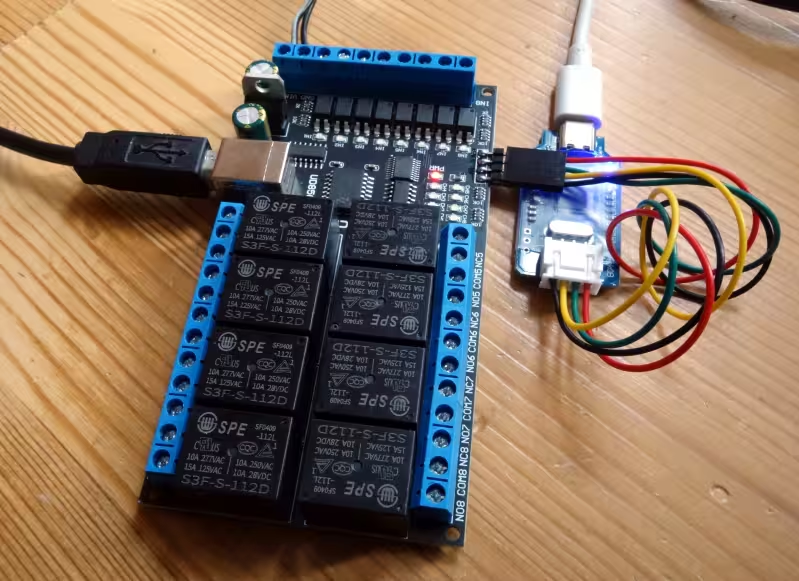 Flashing the Eletechsup UD85C08
In this article:
For a testrig (article coming soon) I needed to switch a couple of relays. I came across the Eletechsup UD85C08 8-channel USB relay board, on AliExpress, and it looked just the thing. It's an inexpensive digital input/output board with 8 SPST relay outputs and 8 optocoupler inputs, and you control it with AT commands over USB-serial.
It does the job, but the protocol feels like it was designed by someone who has heard of AT commands, but never actually used them. What mostly caught my attention was the inconsistent use of line terminators. Every other piece of measurement equipment on my bench speaks SCPI, and this board was the odd one out. So I started wondering: could I make SCPI-compatible firmware for it?
Actually my first impulse was to build my own digital input/output board, but I quickly realised the more sensible approach was to start with better firmware for the board I already had.
And that is what I did. The new firmware emulates an HP 34970A/34972A Data Acquisition / Data Logger Switch Unit on the inexpensive I/O board. It has been written for use with RigKit, but can be used anywhere.
I traced one of my boards, and used Claude to research the MCU. In a few minutes I had the hardware mapped out.
The firmware runs on a MindMotion MM32F0010A1T: an Arm Cortex-M0 running at 48 MHz, in a TSSOP20 package, with 16 kB of flash, 2 kB of RAM, 2 UARTs, 1 SPI, 1 I2C and an ADC. That seems hugely overkill for a simple relay board, but will fit this project nicely.
This is how the pins are connected:
| Pin | Name | Function |
|---|
| 1 | PA11 | not connected |
| 2 | PA12 | UART1_TX → CH340C |
| 3 | PA3 | UART1_RX → CH340C |
| 4 | PA14 | SWDCLK (debug interface), /reset |
| 5 | PB0 | input 1 |
| 6 | PB1 | input 2 |
| 7 | GND/VSS | |
| 8 | PA1 | input 3 |
| 9 | VCC/VDD | |
| 10 | PA0 | shift register SRCLK |
| 11 | PA4 | shift register SER |
| 12 | PA5 | shift register /OE |
| 13 | PA6 | shift register RCLK |
| 14 | PA7 | power LED, active low |
| 15 | PA8 | input 8 |
| 16 | PA9 | input 7 |
| 17 | PA10 | input 6 |
| 18 | PA13 | SWDIO (debug interface) |
| 19 | PA15 | input 4 |
| 20 | PA2 | input 5 |
The USB connection is handled by a CH340C (SO16) USB to serial converter, with only TXD and RXD connected, to UART 1 of the MCU.
The relays are driven by an SM74HC5950 (SO16) shift register, connected to a ULN2803A (SOP18) driver. The relays are SPE branded S3F-S-112D, which seems to be a non-existing part number. They are connected in an order that probably made sense for routing. Inputs use EL817-C445 optocouplers, and are connected directly to the MCU, without a shift register. On images I have seen, the 16-channel version of this board uses shift registers for the inputs as well as for the outputs.
On the side of the board are four pads, connected to VCC, SWDCLK, SWDIO and GND. That is exactly what is needed to program and debug the MCU over SWD (Serial Wire Debug), Arm's two-wire debug interface. It makes sense to have these available, as Eletechsup offers custom firmware as one of their services.
At this point the project looked doable, so I decided to go ahead with it. I didn't want to experiment with the boards that were in the testrig, so I ordered two extra: one to develop on, and one to keep stock for comparison. Plus a debug probe, to connect the computer to those SWD pads. By then, Claude Code had already generated a blinky and a Makefile.
I had never worked with an Arm MCU before, so it took some research to find out which hardware and software to use.
A debug probe sits between the computer and the MCU's debug interface. It's the Arm equivalent of an AVR programmer. After reading up on the options, I picked up a cheap J-Link OB clone.
SEGGER and Keil support the MCU, so that's a promising start, but favouring open source I chose OpenOCD. As it turned out, OpenOCD didn't support this MCU out of the box, but I hadn't realised.
When the boards and the probe came in, Claude Code started controlling the probe and attempted to connect to the board, without asking me for permission. I was surprised, and somewhat shocked, by that. In hindsight I might have unknowingly allowed it, being unfamiliair with the tool.
I found out the clock and data labels on my cheap probe were reversed. Then I discovered that the MCU was not supported by OpenOCD. This was added by Claude Code in minutes. And then there was another problem: a byte that was sent was received as a word, padded with zeroes. This was also fixed by Claude Code in minutes. Only then could I finally start working with the MCU.
The first step was dumping the stock firmware. It's not that I'm really interested in it, but it would have been nice to have a backup. The MCU turned out to be locked, but I hadn't expected otherwise. So the MCU was erased and the blinky flashed.
Despite all this, I have never had a new toolchain, probe, and board up and running this fast.
With the blinky running, it was time for the actual firmware. I gave Claude Code the hardware map and the HP 34970A manual, and let it generate the firmware. That took quite a while. I steered it in the right direction now and then, but that was about all I had to do.
The entire firmware was generated from scratch in a few hours. I have not written a single line of code for it, and that feels really weird. This must be what project managers feel like all the time.
For comparison, most of my firmware projects take over a month.
To make sure the firmware behaved properly, especially since I didn't write it myself, I had Claude Code generate a full suite of unit tests, integration tests and fuzzing. (Yes, I am aware of the pitfalls of testing your own code.)
Besides analysis and tests on my laptop, tests running on the real board were added as well. Claude Code was given control over the USB serial port for this.
I pointed Claude Code to the RigKit source, and it used that to double check the firmware was compatible with RigKit. At some point I worried it would start changing the RigKit code as well, without asking for permission. I don't think it did.
Finally, I tested it in RigKit, and it works exactly as intended.
All of this was within a day's work. Literally: about 5 hours on the day the boards were delivered, and another one or two hours the day after to finalise the code and documentation.
The firmware emulates the HP 34970A closely enough to be recognised as one. It uses the default HP 34970A serial settings: 57600 baud, 8N1, Xon/Xoff. It supports, among other things:
*IDN? identifies the board as HEWLETT-PACKARD,34970A, and includes the MCU id so you can identify individual boards
ROUTe:OPEN (@101) opens a relay
ROUTe:CLOSe (@101) closes a relay
*OPC? waits until the command has been executed (the relay has finished switching), and then returns 1
MEASure:DIGital:BYTE? (@201) reads the 8 digital inputs as a byte
- proper error handling
- relay cycle counting
- input pulse counting (totalizers)
- a watchdog timer
The result is a board that you can talk to like any other instrument on the bench, with the same kind of commands, and without having to special-case its line terminators.
The firmware source in the downloads directory comes with extensive documentation, if you want to know more.
Everything in this project is done using free and open-source software and hardware wherever possible.
Accordingly, the software, article, and documentation created for this project are released into the public domain. You can find the relevant files in the downloads directory associated with this article.
The exception to this is anything I did not create myself, as it is not mine to give away. This includes the HP 34970A manual and command set, which remain subject to their original licences and copyright, and the Eletechsup board itself.
It feels a bit like blasphemy, emulating a robust and expensive HP on an inexpensive dio board. But it makes the little board a lot more useful, imho.
All in all, it was an interesting learning experience.